FINgrowth system: Local, lightweight personal finance manager for Android
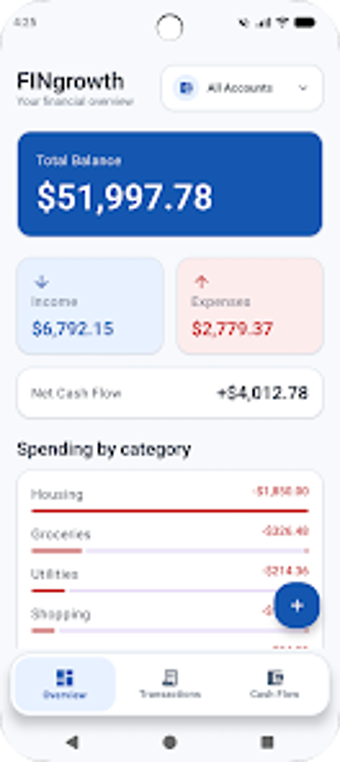
Experience a clean, local-first finance tracker: FINgrowth system, by Jordan Hargrove, consolidates scattered accounts into a single mobile ledger for personal budgeting and cash-flow monitoring. The app displays total balances, net cash flow, categorized spending, time-based cash flow charts, and quick transaction logging to keep daily records current. It also offers advanced search and filters, on-device data storage, and immediate category analysis. Target audience: individuals who want private, single-device financial tracking without cloud synchronization or spreadsheet workarounds.
How FINgrowth consolidates scattered accounts
The app functions as a personal ledger that aggregates balances and transactions into a unified dashboard, presenting total balance, net cash flow, and income-versus-expense comparisons. The Cash Flow view generates charts over weekly, monthly, or yearly periods so trends are visible over time. Transactions are grouped automatically by day, and the app permits categorizing income types such as Salary, Freelance, Dividends, or Interest at entry.
How the app interacts with device storage and runtime
FINgrowth uses roughly 5.33 MB of storage, keeping the installer and on-device database compact for typical Android handsets. Because core data remains on the device, the app does not require constant network connectivity for basic operation. Initial technical notes describe a lightweight profile that fits phones with limited free space, and the design avoids exporting cluttered external spreadsheets for record keeping.
Is it secure to keep financial records on the device?
Data is stored locally by design, reflecting a privacy-first approach that avoids cloud synchronization. Separate technical details indicate attention to data safety, including encryption in transit for any networked operations. This configuration supports offline access and reduces exposure to external servers, a trade-off that prefers local control of financial records over centralized backups.
Do casual users need technical knowledge to operate it correctly?
The interface centers on rapid transaction entry with fields for amount, account, date, and time so daily logging is fast. Advanced filtering and search let more experienced users locate entries by account or transaction type. Live category analysis updates spending breakdowns as items are entered, making the app accessible for non-technical individuals while still offering deeper query tools for power users.
Who benefits most and where the app trades off
FINgrowth is a practical choice for privacy-minded individuals who prefer single-device financial tracking and on-device control of records. The main trade-off is the absence of cloud synchronization or built-in multi-device backup, which limits use across several phones or shared accounts. For users who keep finances on one handset and want compact, offline record-keeping, the app is a focused option; those needing centralized backups should evaluate alternatives.